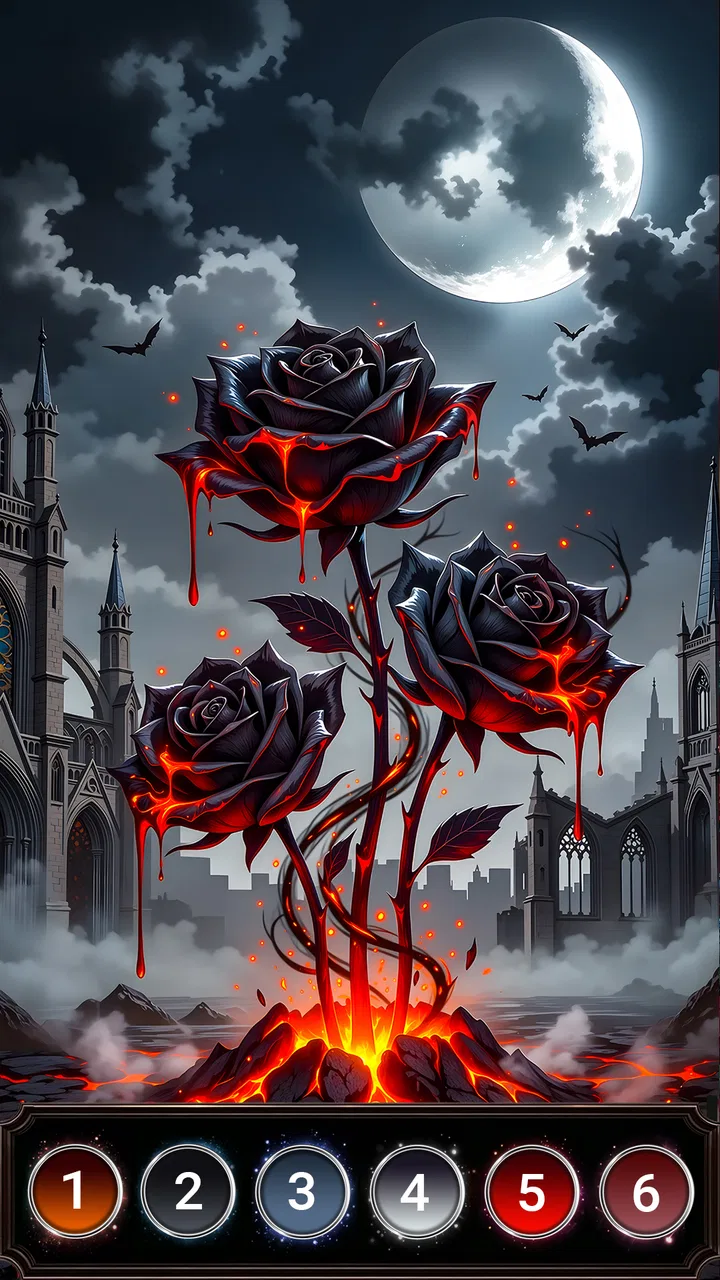
Gothic Symbols Color by Number
- 4.7
- Rating
- 50.00K
- Installs
- Free
- Price

 Analysis by App-foxy
I spent time with Gothic Symbols Color by Number as a quiet, visually focused board game, and its appeal became clear very quickly: it turns color-by-number into something moodier than the usual cheerful coloring-book experience. The artwork leans into gothic symbols, dark backgrounds, blood-themed imagery, and a haunted coloring-book atmosphere. That gives the game a distinct identity instead of making it feel like another interchangeable relaxation app.
My first impression was that this is best understood as a short-session game rather than a traditional board game with opponents, turns, or strategy. You choose a picture, follow its numbered areas, and gradually reveal the finished design. The satisfaction comes from completing small sections and watching a shadowy illustration become more detailed. I found that especially suitable for winding down, waiting somewhere, or taking a break when I wanted something absorbing without having to learn complicated rules.
Joyarc Coloring Games is the developer behind it, and the game is free to start. It is rated for Everyone, although the dark visual style and blood symbol theme may still make it a better personal fit for older children, teenagers, and adults who actively enjoy gothic art. The published average is 4.8 from around 455 ratings, with over 50 thousand installs, so there is already a modest audience for this particular visual direction.
You May Also Like

 Blood Strike: 2.5 Anniversary
Blood Strike’s Loadouts Turn Every Drop Into a Tactical Gamble
A close look at Blood Strike’s custom loadouts: how fast access to signature weapons reshapes its battle royale rhythm, rewards preparation, and narrows the gap between fights.

 Pandora - Music & Podcasts
Pandora’s Music Is Easy to Start, but Harder to Recover
Pandora’s strength is its low-effort path from a seed to a station. Its weak spot is how much confidence it asks you to place in connection, setup, and quiet recovery.

 8 Ball Pool
 Is Built on Rivalries, Rematches, and Routine
A close look at the rivalries, rematches, shared routines, and unanswered safety questions that turn a quick pool match into a persistent mobile community.

 Samsung Music
’s Quiet Strength Is Playing What You Already Own
Its reach comes less from spectacle than from dependable access to a personal library. That simplicity is both the app’s strongest retention engine and its ceiling.

 AccuWeather: Weather Radar
AccuWeather Review: A Quick, Clear Forecast for Everyday Decisions
For everyday plans, the best forecast is the one you can understand quickly. AccuWeather makes rain timing, radar, and local conditions easy to act on, with a few trade-offs.

 Hill Climb Racing
Why Hill Climb Racing Still Turns Crashes Into One More Run
A tiny car, a bumpy hill and one more upgrade: Hill Climb Racing keeps resurfacing because its simple chaos makes every near-miss feel personal.
More From Our News Desk
View All News


How the coloring feels in ordinary use
I find the coloring most satisfying when I treat each picture as a series of small visual decisions rather than a race to finish. Starting with broad, easy-to-spot sections gives me a clear sense of progress; saving the finer details for a slower pass helps avoid careless taps. That approach also makes it easier to pause at a natural stopping point and return with fresh eyes.
A gentle pace rather than a reflex challenge
The central interaction is deliberately unhurried. Color-by-number games do not usually demand fast reactions, and this one is most enjoyable when I treat each image as a small project rather than something to rush through. I can work through obvious areas first, then return to the tiny spaces that require more concentration. That rhythm makes it easy to stop and resume mentally, even during a short break.
What matters for perceived speed here is not a competitive frame rate or rapid action. It is whether the image responds promptly enough to keep the coloring flow intact. In my sessions, the experience felt oriented toward steady tapping and visual checking. The dark presentation also affects how fast I work: pale or strongly contrasting areas are easy to identify, while intricate sections naturally slow me down because I want to avoid tapping the wrong region.
That is a useful distinction for anyone choosing between this and a more conventional coloring app. If you want instant, bright, low-effort pictures, the gothic artwork may feel visually heavier. If you enjoy examining details and revealing a design with a slightly mysterious mood, the slower pace is part of the attraction rather than a defect.
Why the dark artwork changes the experience
The visual theme is not just a coat of paint over ordinary coloring pages. Dark backgrounds and symbolic imagery make completion feel more like uncovering an illustration than filling a cheerful pattern. I noticed that this changes how I use the game: I pay more attention to composition, shadows, and the relationship between the colored sections instead of tapping mechanically through a checklist.
There is also a practical trade-off. Dark artwork can be easier on the eyes in a dim room than a page dominated by bright white, but the smallest areas may demand more attention. I would not recommend turning the screen brightness down aggressively just because the theme is dark. A comfortable brightness setting makes the numbered regions easier to distinguish and reduces the need to zoom or repeatedly check a missed space.
A realistic everyday session
For me, the most natural scenario is a ten-minute pause after work or study. I can open a picture, complete a handful of clearly marked sections, and stop before the activity becomes another obligation. It also fits a commute or waiting-room situation when I want an offline-feeling pastime without the pressure of a puzzle timer or a multiplayer match.
Another useful routine is to reserve the game for the end of the day. The repetitive tapping gives my attention one simple task, while the gothic visuals provide more personality than generic geometric coloring. I would avoid using it while multitasking heavily, though. The small numbered areas reward concentration, and trying to watch a video or hold a conversation at the same time makes the activity less satisfying.
What happens during longer coloring sessions
Heavy use in this game means moving through detailed illustrations for an extended period, switching between broad areas and tiny sections, and repeatedly checking the image for unfinished spots. That is a different kind of demand from a fast action game. The main pressure is likely to come from sustained screen time and the amount of visual attention required, not from rapid animation or complex game logic.
I found it helpful to work in passes. First, I fill the large areas that are easy to recognize. Next, I look around the edges of the illustration, where small gaps can hide. Finally, I inspect the remaining numbered spaces and use the current color as a guide. This workflow is more reliable than tapping randomly, and it makes a nearly finished picture feel less frustrating.
A second practical tip is to pause before chasing the last few cells. When only tiny regions remain, it is tempting to tap rapidly across the image. That can turn a relaxing activity into a search exercise. I get better results by scanning one section at a time and checking whether a number is partially concealed by surrounding artwork. The game’s dark style makes this method particularly useful because visual contrast is not uniform across every part of a picture.
Longer sessions may also expose the limits of the format. Once I have completed several images, the basic gesture can begin to feel repetitive. The gothic theme keeps the presentation distinctive, but it does not transform color-by-number into a deep strategy game. Players looking for evolving mechanics, competition, or a strong progression system should choose a different board or puzzle experience.
Keeping the phone comfortable during use
Because the game is built around viewing artwork and tapping precise areas, comfort matters more than raw speed. I prefer holding the phone securely with one hand and using the other for coloring when an image contains many small sections. That reduces accidental taps and makes it easier to inspect the corners of the picture. On a larger screen, the artwork should be more comfortable to study, while a compact phone is convenient for quick sessions but may make fine details feel crowded.
I would also avoid judging the game from a single rushed launch. A coloring session involves loading an image, examining its layout, and settling into the controls. If the phone is already busy with many other apps, the overall experience may feel less immediate regardless of the game itself. Closing demanding background activity before a long session is a sensible habit, especially on an older device.
Stability, recovery, and device fit
For device fit, I pay attention less to raw power than to whether the screen makes the artwork comfortable to inspect and the touch response easy to control. A smaller display can make the final scattered spaces more demanding, so I would choose shorter sessions on a compact phone and take a break if I start tapping by guesswork. The next section looks at what helps a session feel dependable and how to resume calmly after an interruption.
What I expect from a stable session
A game with this kind of interaction should feel dependable when I tap, change colors, and return to the picture. There is no benefit in a beautiful gothic illustration if interruptions make progress uncertain. My practical standard is simple: the selected area should react clearly, the current coloring state should remain understandable, and returning to the game should not create confusion about what has already been completed.
Gothic Symbols Color by Number presents itself as a focused and relatively simple experience, which sets a reasonable expectation for smooth everyday use on compatible phones. Its current version is 1.0.8, and it supports devices running Android 7.0 or later. Those details make it accessible to a broad range of Android users, including people who are not carrying a recent flagship phone.
Still, compatibility is not the same as identical performance on every device. A phone that meets the minimum operating-system requirement may have a smaller display, less available memory, or an older processor than a newer model. That can affect how comfortable detailed coloring feels, even when the game itself is suitable to install. I would treat the minimum requirement as a doorway, not a promise of the best visual experience.
Recovering after an interruption
Color-by-number is unusually vulnerable to interruptions because the user may be halfway through a detailed picture. A phone call, low battery, accidental swipe, or switch to another app can break concentration. My advice is to finish a recognizable subsection before leaving the game whenever possible. That gives me a clear visual landmark when I return instead of forcing me to remember exactly which tiny areas were completed.
I also avoid tapping repeatedly if the screen seems slow to respond. Repeated input can make it harder to tell whether an area was accepted once the interface catches up. A better recovery habit is to pause briefly, check the selected color, and then continue with one deliberate tap. This is useful in any color-by-number game, but the fine details and dark artwork make careful input especially worthwhile here.
If I were using the game on a device with limited free storage or memory, I would keep the surrounding environment tidy before starting a long session. I would not expect the same comfort from an aging phone as from a newer one, particularly when the screen is small or touch accuracy is inconsistent. The game’s accessible Android requirement is a strength, but the final experience still depends on the condition of the handset.
Resource demands in practical terms
This is not the sort of game I choose for high-intensity graphics or network competition. The activity is centered on static artwork, color selection, and touch interaction, so I would expect its demands to be more modest than those of a modern three-dimensional game. That makes it a sensible candidate for casual play on an older compatible Android phone, provided the display and touch response are comfortable.
Even modest games can become inconvenient when used for a long time. Keeping the screen active consumes battery, and extended coloring can make any phone feel warmer than it does during brief checks. I usually handle that by taking breaks, lowering brightness only as far as the artwork remains easy to read, and avoiding a long session when the battery is already nearly empty. These are small habits, but they protect the relaxing quality of the experience.
One trade-off is the in-app purchase range. The game is free, but optional items are listed from $0.99 to $39.99 each. That means I would start without spending anything and pay attention to which content or extras are genuinely useful before considering a purchase. The broad range makes it important for families to review purchase controls, even though the content rating is Everyone. Free entry is appealing, but it should not be confused with unlimited access to every possible item at no cost.
Who should choose it, and who should skip it
I would recommend this game to someone who likes coloring, symbolic artwork, and a darker atmosphere than the typical relaxation app provides. It is particularly suitable for short solo breaks, quiet evening use, and people who enjoy completing visual tasks without timers or competitive pressure. The distinctive theme is its strongest reason to choose it.
I would skip it if I wanted a conventional board game with tactical decisions, opponents, dice, or a meaningful multiplayer layer. I would also look elsewhere if bright, cheerful illustrations are important to me, since the haunted presentation is central to the identity rather than a minor option. Players who become bored with repeated tapping may prefer a puzzle game with changing rules and more active problem-solving.
Compared with ordinary coloring apps, this one offers a clearer artistic niche. Many coloring alternatives aim for broad appeal through animals, mandalas, landscapes, or decorative patterns. Gothic Symbols Color by Number instead asks whether I want the mood of an eerie coloring book. Compared with puzzle-board games, it sacrifices strategic depth for accessibility and visual completion. That is a fair exchange for the right audience, but not a universal advantage.
My final performance verdict
After considering speed, longer sessions, stability, and device constraints, I see this as a lightweight-feeling casual game whose success depends more on visual comfort and personal taste than on technical spectacle. The experience is best when I give it a few uninterrupted minutes, use a sensible brightness level, and approach detailed images methodically. Its Android 7.0 minimum makes it approachable for many users, while the current 1.0.8 release gives the game a defined version to look for when installing.
The strongest practical insight is that the dark theme changes both the mood and the workflow. I need to scan carefully, avoid rushing the final spaces, and choose a screen setting that keeps the numbers readable. The second is that the game works better as a repeatable decompression ritual than as a single marathon. The third is that free access should be paired with awareness of optional purchases, especially on a shared family device.
My recommendation is positive but specific: try it if gothic imagery makes coloring more interesting for you. The 4.8 average and growing audience suggest that the concept has connected with players, but those figures should not replace personal taste. The real question is whether you want a calm color-by-number routine with a haunted visual identity. If the answer is yes, Joyarc Coloring Games has made a focused option that is easy to understand, comfortable for short breaks, and more memorable than a generic coloring board. If you need strategy, competition, or energetic gameplay, your time and storage would be better spent elsewhere.
FAQs for Gothic Symbols Color by Number
01What is Gothic Symbols Color by Number?
Gothic Symbols Color by Number is a mobile app that allows users to relax and unwind by coloring intricate gothic-themed designs. Each symbol is broken down into a numbered grid, and users can fill in colors according to the number key. It's available on both Android and iOS devices.
02How does the coloring process work in the app?
The app utilizes a color-by-number system. Each gothic symbol is divided into sections, each marked with a number. Users select a color corresponding to the number and fill in the sections. This method ensures an easy, stress-free coloring experience, perfect for both beginners and experienced users.
03Is Gothic Symbols Color by Number free to use?
The app is free to download and use, offering a selection of free gothic symbols to color. However, it may contain in-app purchases that provide additional symbols, features, or an ad-free experience. Users can choose to buy these extras to enhance their coloring activities.
04What features make this app unique?
Gothic Symbols Color by Number stands out with its unique theme, offering beautifully designed gothic symbols. The app includes a user-friendly interface, zoom functionality for detailed coloring, and a calming soundtrack that enhances the overall experience. It's ideal for users seeking a creative escape.
05Are there any age restrictions for using the app?
The app is suitable for all ages, with content that's appropriate for both younger and older audiences. However, parental guidance is advised for younger users due to in-app purchase options. The gothic theme may appeal more to teens and adults who appreciate its unique artistic style.
Pros
- User-friendly interface for all ages.
- Extensive library of gothic symbols.
- Soothing color-by-number experience.
- Offline mode available for convenience.
- Regular updates with new designs.
Cons
- Limited color palette options.
- Ads can be intrusive at times.
- No option for custom designs.
- Requires in-app purchases for extras.
- May drain battery quickly on older devices.

Gothic Symbols Color by Number
Gallery